
Find terms that mean the same thing and merge them into one.
Find duplicates
- Turn on Duplicate Terms in WP Taxonomy → Add-ons.
- Go to WP Taxonomy → Term Tools → Duplicate Terms.
- Choose a taxonomy and click Find duplicates.
- Review the results. Candidate groups contain terms whose names match when letter case, accents, and most punctuation are ignored. Similar names to review lists hints, such as similar spelling (Tutorial and Tutorials) or shared initials (WordPress and WP).
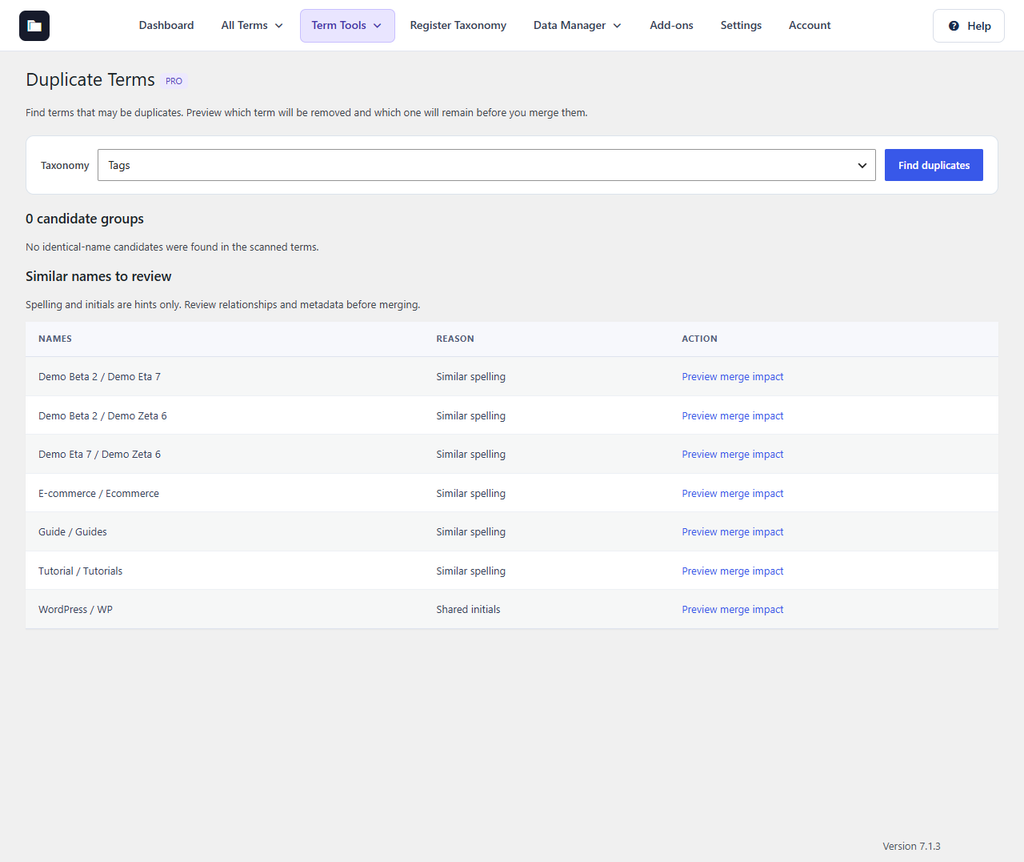
Figure 34. Similar tag names found by the duplicate finder.
Merge two terms
- Click Preview merge impact next to the pair.
- Read the impact: how many posts move to the remaining term, how many child terms get a new parent, and how many metadata values conflict.
- Type MERGE and click Merge terms.
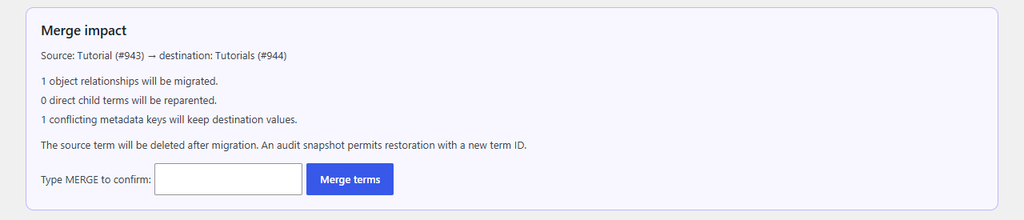
Figure 35. Merge impact for Tutorial and Tutorials.
The source term is deleted after its content has moved. Nothing is merged automatically. Merge history keeps a snapshot of each merge, so you can restore the removed term; it gets a new ID. With path-based permalinks, the removed term’s old address redirects to the remaining term.