
Auto Tagging adds categories or tags to a published post when you save it.
Keyword rules
- Go to WP Taxonomy → All Terms → Auto Tagging → Manually.
- Click Add a keyword rule.
- In Keywords, type one or more words or phrases, separated by commas.
- Choose the Category or tag group, for example Categories, and the Category or tag to add. The term must already exist.
- Click Save auto tagging settings.
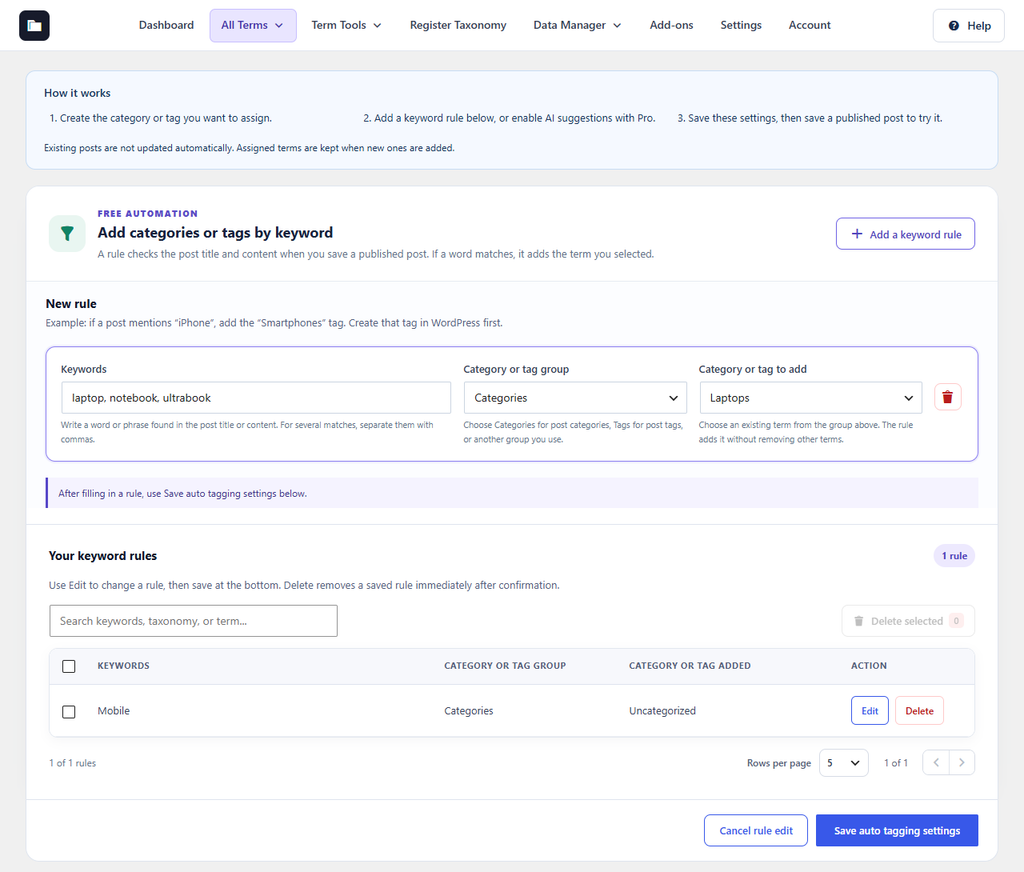
Figure 25. A rule that adds the Laptops category when a post mentions laptop, notebook, or ultrabook.
When the title or content of a published post contains a keyword, the term is added to the post. Terms already on the post are kept. Existing posts change only when you save them again. Use Edit or Delete under Your keyword rules to change your rules.