
Update custom field values on existing terms by editing a spreadsheet.
- Go to WP Taxonomy → Term Tools → Term Meta Transfer.
- Choose a taxonomy and click Show fields. The supported fields are listed as columns, such as meta:short_label.
- Click Export CSV template and fill in the values in a spreadsheet. Keep the slug column so that each row matches an existing term.
- Under Preview and apply, choose the edited file and click Preview CSV.
- Check the summary, then click Apply changes.
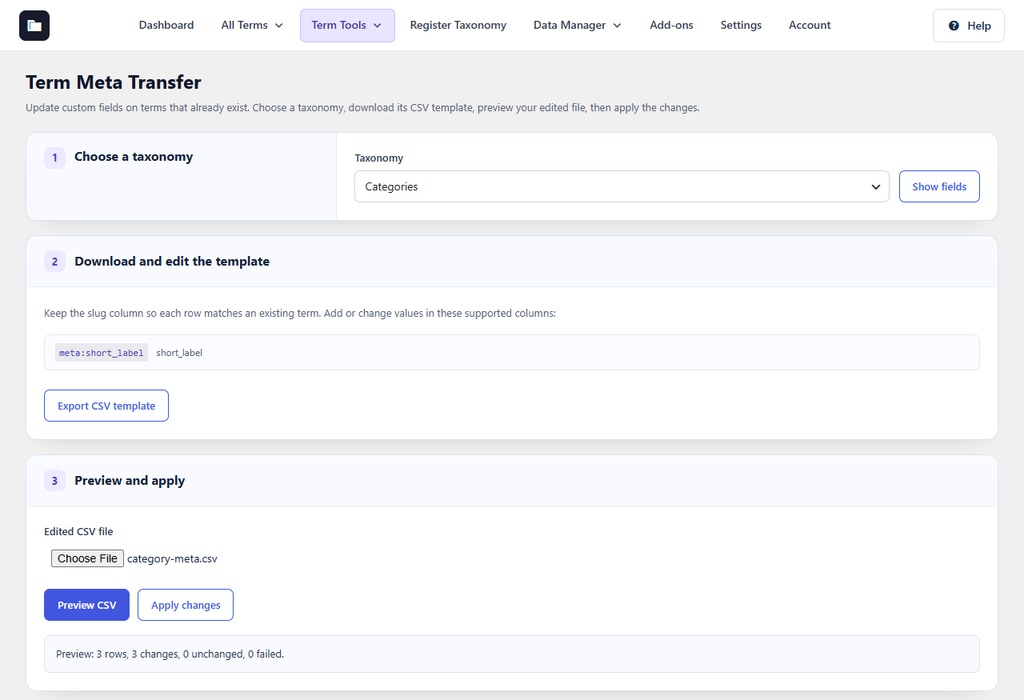
Figure 32. The preview found three changes, ready to apply.
Supported fields are single-value term metadata registered by a theme or plugin, and ACF taxonomy fields when Advanced Custom Fields and the ACF Term Fields add-on are active. Fields created in Term Fields are not listed here. Term Meta Transfer does not create terms.