
The Demo Generator creates sample terms for testing a theme or a staging site.
- Go to WP Taxonomy → All Terms → Demo Generator.
- Choose a taxonomy and the number of terms (1 to 500).
- Under Term Structure, choose Flat terms or Parent / child. Parent / child is available for hierarchical taxonomies.
- Under Name Format, choose Prefix, Plain, or Random Words.
- Optionally tick Descriptions and Skip existing.
- Click Generate Demo Terms.
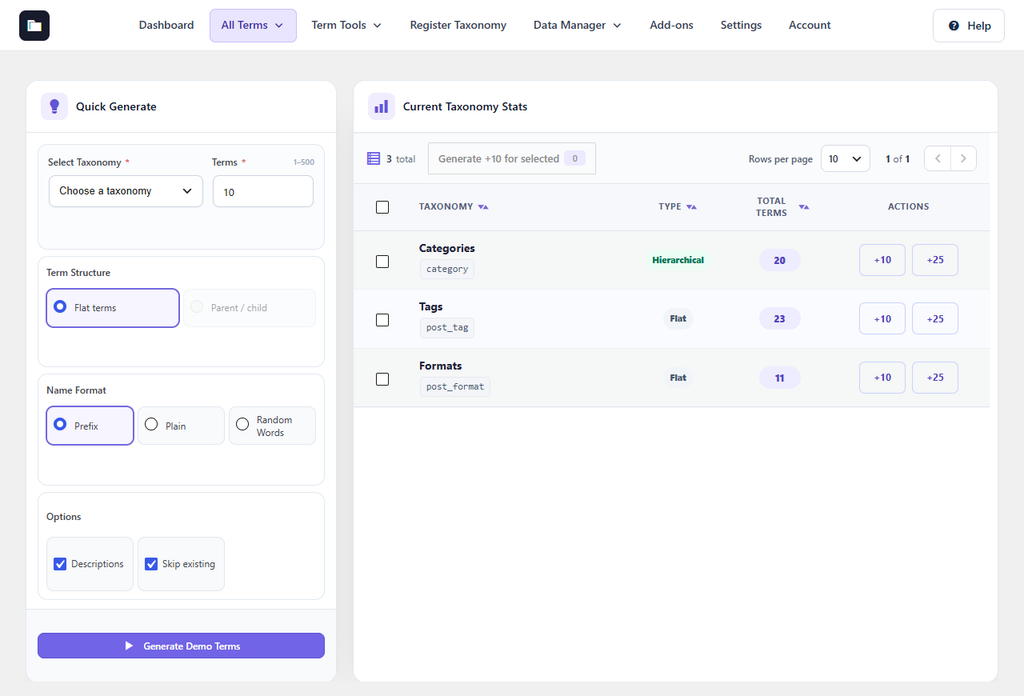
Figure 21. The Demo Generator.
The Current Taxonomy Stats table shows how many terms each taxonomy has. Its +10 and +25 buttons add terms in one click. Delete demo terms before you use the site for real content.