
All Terms shows the terms of every taxonomy in one table.
- Go to WP Taxonomy → All Terms.
- Type in Search terms… or choose a taxonomy, then click Apply. Click Clear to show everything again.
- To edit a term, click Edit in its row, change the Name, Slug, or Description, and click Save changes. To change the parent or other fields, click Advanced edit, which opens the WordPress term screen.
- To delete terms, tick them and click Delete selected, or click Delete in a row, then confirm.
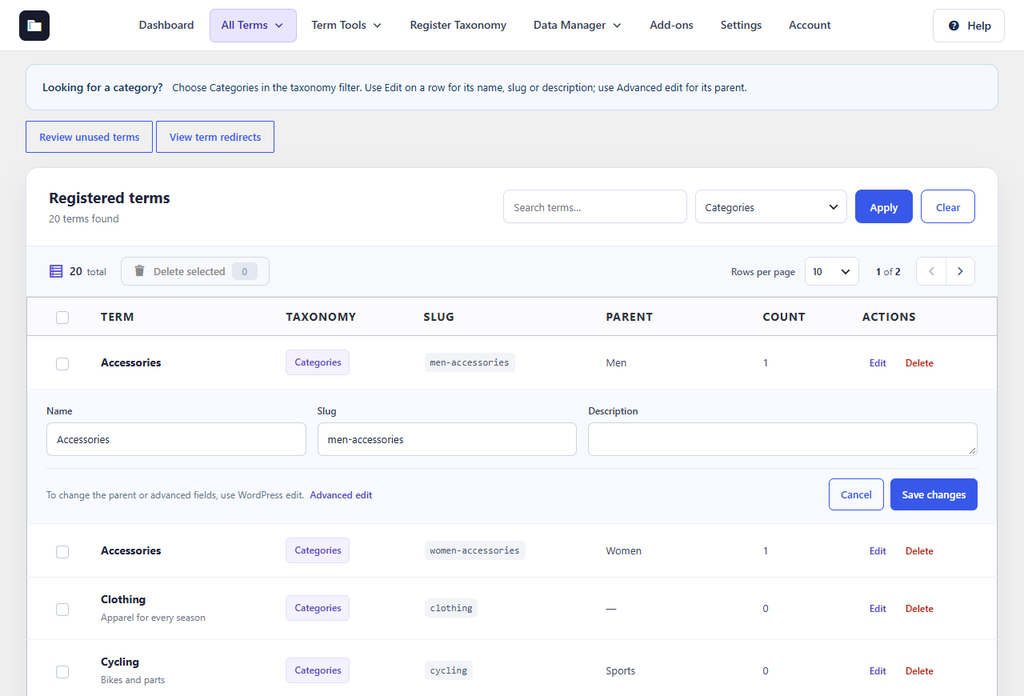
Figure 17. All Terms filtered to Categories, with one term open for editing.
Warning: Deleted terms cannot be restored from this screen. Export a CSV file first if you might need them again.
The buttons above the table open Unused Terms and Term Redirects.